Best Samsung Galaxy A36 Camera Settings
A stabilised 50MP main camera, an 8MP ultra-wide and 4K video, with One UI 9 since October 2026.
Published ·Last updated
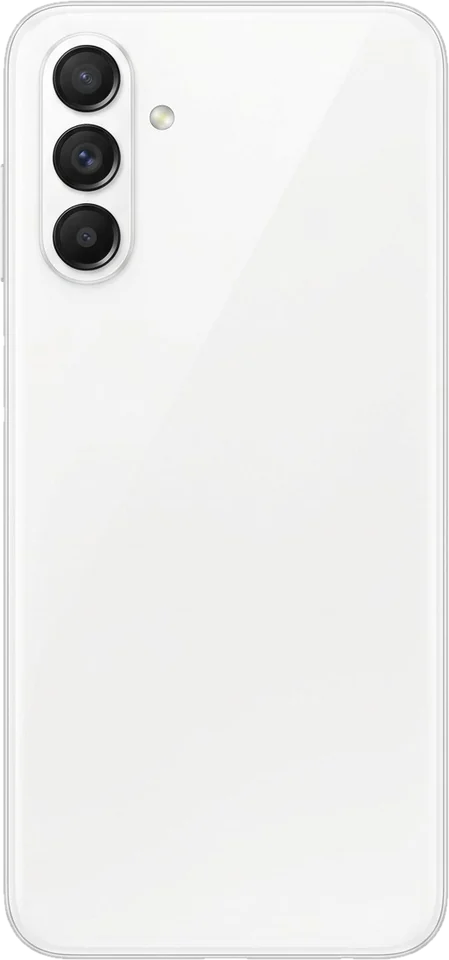
The Galaxy A36 has a stabilised 50MP main camera, an 8MP ultra-wide and a 5MP macro, with no telephoto. Reviewers found its daylight photos detailed and a little punchy, while night shots and the ultra-wide were the weak spots. These settings lean on the 1x main camera and work around the rest, so treat them as starting points for your own light.
Galaxy A36 camera specs
| Lens | Resolution / aperture | Notes |
|---|---|---|
| 0.6x ultra-wide | 8 MP · f/2.2 | 123° view, 1/4-inch sensor, fixed focus. Video up to Full HD 30fps |
| 1x main | 50 MP · f/1.8 | 1/1.96-inch sensor, autofocus, OIS. Saves 12.5MP by default |
| 2x | Sensor crop · f/1.8 | A crop of the main sensor. Digital zoom stops at 10x |
| Macro | 5 MP · f/2.4 | Fixed focus |
| Selfie | 12 MP · f/2.2 | Fixed focus, 4K at 30fps with 10-bit HDR |
Video: 4K at 30fps and Full HD at up to 60fps on the main camera, Full HD at 30fps on the ultra-wide, with stabilisation. No 4K at 60fps and no 8K
Signature features: OIS on the main camera · Pro and Night modes · Object Eraser and Edit suggestions · Camera Assistant since One UI 8.5 · Up to six OS upgrades promised

Settings to change first
| Setting | Recommended value | Why |
|---|---|---|
| Grid lines | On | The grid helps you level horizons and place subjects. |
| Auto HDR | On | It merges shots to keep detail in bright skies and backlit faces. |
| Scene optimizer | Off if colours look too rich | GSMArena found the A36's colours a touch oversaturated. |
| Swipe Shutter button to | A burst of photos | A swipe catches a run of shots of moving kids and pets. |
| Video stabilization | On | It keeps handheld 4K steady. |
Settings by situation
The screenshots are from our own Galaxy S25 Ultra on One UI 9. On the A36 the same settings are in the same places, but some menus can look slightly different, especially on older One UI versions.
Everyday and travel
The 1x main camera is the only one with OIS and autofocus, so it's the one to trust on this phone.
| Setting | Value | Why |
|---|---|---|
| Lens | 1x for most scenes, 0.6x for big views in daylight | GSMArena wasn't impressed by the 8MP ultra-wide, and Tom's Guide found its distant detail looked painted. |
| Resolution | Default (12.5MP), or 50MP for bright, still scenes | GSMArena's 50MP samples had more detail, but took longer to process and made much larger files. |
| Zoom | Stay at 2x or below | 2x is a crop of the main sensor, and Notebookcheck found digital zoom past 2x really poor. |
| Auto HDR | On | It merges several shots to keep detail in a bright sky and in a shaded face. |
| Scene optimizer | Off if colours look too rich | GSMArena found the A36's colours a touch oversaturated. |

Portraits
With no telephoto, the 2x crop is the closest thing to a portrait lens.
| Setting | Value | Why |
|---|---|---|
| Lens | Portrait mode, or Photo mode at 2x | Keep the background well behind the person, then check the edges of their hair. |
| Blur strength | Below the maximum | Edges around hair look more natural with less blur. |
| Group shots | Take several frames and keep the best one | Samsung's launch release lists Best Face for the A56, so don't count on it to fix closed eyes on the A36. |
| Selfies | Face a window or a lamp | GSMArena liked the 12MP front camera's detail, while Tom's Guide found selfies soft in high-contrast light. |

Low light and night
GSMArena found Night mode a clear step up from Photo mode, but exposure and colour varied from shot to shot, so take more than one.
| Setting | Value | Why |
|---|---|---|
| Mode | Night (under More) at 1x | It gave cleaner shadows and better-held highlights than Photo mode in GSMArena's test. |
| Steadiness | Prop the phone on a wall, rail or table, tap to focus, then hold still until it finishes | A night shot takes a few seconds, and Tom's Guide got a murky, blurry 3-second shot of a garden. |
| Frames | Two or three of each scene | Similar shots came out with different exposure and colour in testing. |
| Lens | 1x only | The ultra-wide's small 1/4-inch sensor struggles after dark. |
| Pro mode | Lowest ISO that gives a bright enough preview | Samsung lists ISO, exposure value, white balance and colour tone as Pro mode's controls. |

Action, kids and pets
Daylight helps the most, because the camera can then pick a fast shutter speed by itself.
| Setting | Value | Why |
|---|---|---|
| Burst | Set Swipe Shutter button to a burst, then swipe the shutter | Samsung's A-series camera page lists the setting under Pictures in Camera settings. |
| Indoors | Shoot near a window | More light means a faster shutter and less blur. |
| Resolution | Default, not 50MP | 50MP files take longer to process between shots. |
Video
The main camera records 4K at 30fps with OIS, and Notebookcheck found the stabilisation effective.
| Setting | Value | Why |
|---|---|---|
| Everyday clips | 4K at 30fps on the 1x camera, Video stabilization on | It's the highest resolution and frame rate the rear cameras offer. |
| Fast movement | Full HD at 60fps | Smoother motion at a lower resolution. |
| Wide shots | 0.6x at Full HD 30fps | The ultra-wide can't record 4K. |
| Storage | High efficiency videos on if space is tight | HEVC files are smaller, but some older devices can't play them, so share a standard copy if needed. |
| Vlogging | Front camera at 4K 30fps | Samsung says the front camera records 10-bit HDR video. |
| Slow motion | Slow motion or Super slow motion under More | Samsung's A-series camera page lists both modes for the A36. |

Editing
The A36 has Samsung's Awesome Intelligence editing tools, which are a smaller set than Galaxy AI on the S series.
| Setting | Value | Why |
|---|---|---|
| Object Eraser | Gallery > Edit > tools icon (four circles) > Object eraser | Tap or outline the distraction, then tap Erase. Our Object Eraser guide shows which jobs it handles well. |
| Edit suggestions | Swipe up on a photo in Gallery | One-tap fixes such as Remaster and Erase shadows. |
| RAW files | Not listed | Samsung's A-series camera page has no RAW option, and the Expert RAW device list doesn't name the A36. |
| Edits in other apps | Lightroom mobile or Snapseed on the JPEG | Light edits keep the file clean. Our photo editor guide covers Gallery's own tools. |
Menu paths on the A36
The A36 launched on One UI 7, and Samsung promises up to six generations of OS upgrades. SamMobile reported One UI 8.5 arriving from 18 May 2026, and Android Central reported stable One UI 9 (Android 17) from 15 October 2026, reaching Europe from 19 October. Samsung's A-series camera page still uses One UI 7 names, so the paths below give those. On One UI 9 some may match the flagship names instead, such as Composition guide for Grid lines and Photo enhancer for Scene optimizer.
| What you want | Where to find it |
|---|---|
| Grid | Camera settings > General > Grid lines (Composition guide on flagships) |
| Auto HDR | Camera settings > General > Auto HDR |
| Scene optimizer | Camera settings > Intelligent features |
| Burst gesture | Camera settings > Pictures > Swipe Shutter button to |
| HEIF photos | Camera settings > Pictures > High efficiency pictures |
| HEVC and stabilisation | Camera settings > Videos |
| Volume keys and Show palm | Camera settings > General > Shooting methods |
| Mirrored selfies | Camera settings > Selfies > Save selfies as previewed |
| Pro, Night, Macro and Panorama | Mode strip > More |
| Camera Assistant | Galaxy Store, on One UI 8.5 or later |


What the A36 can't do
- There's no telephoto, so 2x is a crop and digital zoom stops at 10x. Notebookcheck found anything past 2x very poor.
- Rear video stops at 4K 30fps on the main camera and Full HD 30fps on the ultra-wide, with no 4K at 60fps, no 8K and no Samsung Log.
- Samsung lists only ISO, exposure value, white balance and colour tone for Pro mode, and no Pro video mode, so don't count on a manual shutter speed.
- Expert RAW's device list doesn't name the A36, and Samsung lists no RAW option for its camera.
- The 8MP ultra-wide and the 5MP macro are both fixed focus. Our macro guide covers other ways to get close.
- Photo Assist and Generative Edit stay on Samsung's Galaxy AI phones. Our Galaxy AI camera guide explains which tools need it.
- Moving people blur at night, because each night shot takes a few seconds.
Frequently asked questions
What are the best camera settings for the Galaxy A36?+
Use the 1x main camera at its default resolution with Grid lines and Auto HDR on, and the 2x crop for portraits. At night, use Night mode at 1x with the phone braced and take a few frames. Record 4K at 30fps with Video stabilization on.
Does the Galaxy A36 shoot RAW or have Expert RAW?+
Samsung's Expert RAW device list doesn't name the A36, and its A-series camera page lists no RAW option. Pro mode gives manual ISO, exposure value, white balance and colour tone instead.
Can the Galaxy A36 record 4K at 60fps?+
No. The main camera tops out at 4K 30fps, with Full HD at up to 60fps, and the ultra-wide records Full HD at 30fps. The front camera also records 4K at 30fps.
Does the Galaxy A36 have Camera Assistant?+
SamMobile listed the A36 when Camera Assistant support expanded with One UI 8.5 in June 2026, so install it from the Galaxy Store once your phone has that update. Samsung hasn't said which of the app's options the A36 gets.
Is the Galaxy A56 camera better than the A36?+
Slightly. Both have a 50MP f/1.8 main camera with OIS, but the A56's sensor is bigger, its 12MP ultra-wide records 4K, and GSMArena found its night shots better. By day the difference was hard to spot. Our A56 settings page covers that phone.
Everything for your Samsung Galaxy A36
A36 camera guides
- → Samsung Galaxy A36 Camera: Review, Settings and A36 vs A56, what reviewers found and how it compares with the A56
Features that work on your A36
- → Best Samsung Camera Settings for Better Photos (2026)
- → Samsung Pro Mode Guide: Manual Camera Control Explained
- → Samsung Night Mode: Sharper Low-Light Photos, bracing and timing for longer captures
- → Samsung Portrait Mode: Sharp Subjects, Creamy Bokeh
- → Samsung Camera HDR: Where the Toggle Went and What's Left
- → Samsung Burst Mode: How to Capture Fast Action with Galaxy Phones
- → Samsung Panorama Mode: How to Get Clean, Level Panoramas
- → How to Use Object Eraser and Photo Assist on a Samsung Galaxy, removing distractions in Gallery
- → Samsung Camera Assistant: Every Setting and When to Use It, the app the A36 can use since One UI 8.5
- → How to Make Samsung Photos Look Natural (Less Over-Processed)
Thinking of upgrading?
- → Galaxy A56 Camera: Claims vs What Reviewers Found, the A36's bigger-sensor sibling
- → Galaxy A57 and A37 Camera: Settings, Differences and Limits, what the 2026 models change
- → Galaxy A58 and A38: Release Date, Price & Camera Leaks
- → Best Samsung Phone for Photography in 2026: Every Galaxy Camera Ranked
Related on this site
Other model settings
Want the full system behind these tips?
Samsung Photography Academy is a course of 60+ short 5-minute lessons that takes you from beginner to portfolio-grade shots: designed specifically for Samsung phones.
See the course →