Best Samsung Galaxy S26 and S26+ Camera Settings
The S26 and S26+ share a 50MP main camera, a 3x telephoto and a 12MP ultra-wide, with 24MP and Night controls on One UI 9.
Published ·Last updated
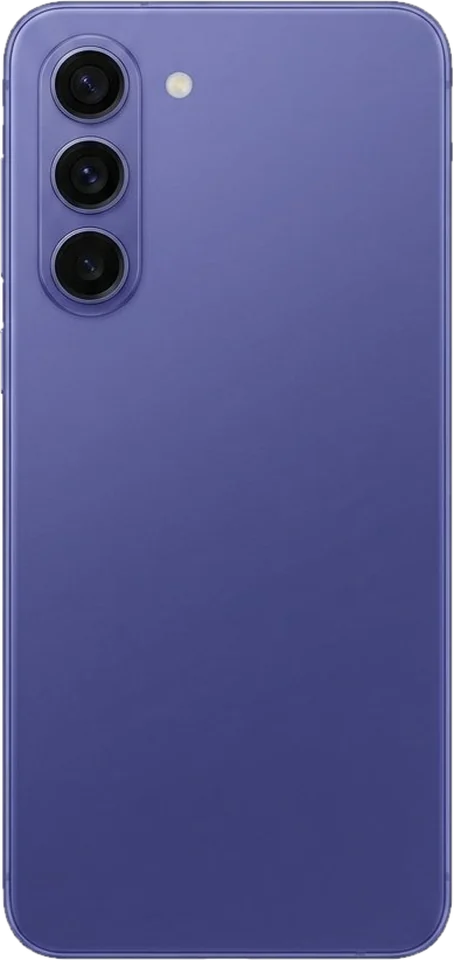
The Galaxy S26 and S26+ have the same cameras: a 50MP main, a 12MP ultra-wide and a 10MP 3x telephoto, plus a 12MP selfie camera. Samsung lists identical specs for both, so every setting here works on either phone. Reviewers liked the daylight colour and dynamic range, while the 3x and night shots were weaker. The tables give starting values for each situation, with the One UI 9 menu paths.
Galaxy S26 camera specs
| Lens | Resolution / aperture | Notes |
|---|---|---|
| 0.6x ultra-wide | 12 MP · f/2.2 | 13mm, 120° view, fixed focus |
| 1x main | 50 MP · f/1.8 | 24mm, 1/1.56-inch sensor, Dual Pixel AF, OIS |
| 2x | Sensor crop · f/1.8 | A crop of the 50MP main sensor that Samsung rates as optical quality |
| 3x telephoto | 10 MP · f/2.4 | 67mm, 1/3.94-inch sensor, OIS. Digital zoom continues to 30x |
| Selfie | 12 MP · f/2.2 | 23mm, autofocus, normal and wide views, 4K at 60fps |
Video: 8K at 30fps on the main camera, 4K at up to 60fps on every camera, 10-bit HDR, HDR10+ and Samsung Log with a LUT preview. No 4K at 120fps and no APV, which stay on the S26 Ultra
Signature features: 24MP in Photo mode via Camera Assistant · Night shot in Photo mode (Off, Auto, Max) · Super steady with Horizontal lock · Samsung Log in Pro Video · Expert RAW

Settings to change first
| Setting | Recommended value | Why |
|---|---|---|
| Composition guide | Grid lines and level | The level keeps horizons straight before you shoot. |
| 24MP resolution (Camera Assistant) | On for daylight, 12MP indoors | More detail than 12MP in good light, while 12MP stays cleaner when the light drops. |
| Press Volume buttons to | Take picture or record video | A side key shakes the phone less than a screen tap. |
| Scene detection | On for quick shares, off when colours look overdone | It sits inside Photo enhancer on One UI 9. |
| Pro mode picture format | RAW and JPEG | You get a DNG to edit next to the usual JPEG. |
| Quick tap shutter (Camera Assistant) | On | The photo fires the moment you touch the button. |
| Video format | HEVC, with HDR on | 10-bit HDR holds more highlight detail, and HEVC keeps the files a manageable size. |
Settings by situation
The screenshots are from our own Galaxy S25 Ultra on One UI 9. On the S26 the same settings are in the same places, but some menus can look slightly different, especially on older One UI versions.
Everyday and travel
The 1x main camera has by far the largest sensor of the three, so it's the default for most scenes.
| Setting | Value | Why |
|---|---|---|
| Lens | 1x for most scenes, 0.6x for big views, 3x for details in daylight | The 3x has a small 1/3.94-inch sensor and does its best work in good light. |
| Resolution | 24MP in daylight, 12MP indoors and after dark | 24MP needs Camera Assistant. At 12MP the phone combines pixels to keep noise down. Our resolution guide compares them. |
| Ultra-wide | Subjects a metre or more away | It's fixed focus, so close subjects go soft. |
| Scene detection | Off if colours look heavier than the real scene | TechRadar found the S26's photos a touch oversaturated. Our natural-looking photos guide covers the other switches. |

Portraits
Use the 3x outdoors and the 2x crop of the main camera indoors or at dusk.
| Setting | Value | Why |
|---|---|---|
| Outdoors | Portrait mode at 3x, about 1.2m away for head and shoulders | The longer lens flattens features. Trusted Reviews found the 3x can hunt for focus, so tap the face first. |
| Indoors or at dusk | Portrait mode at 2x | It's a crop of the main sensor, which keeps more detail than the 3x when the light drops. |
| Blur strength | Below the maximum | Edges around hair look more believable, and you can change the blur again in Gallery. |
| Prioritize focus over speed (Camera Assistant) | On | The shutter waits until focus has settled on the face. |

Low light and night
Since One UI 8.5, Night sits inside Photo mode as a moon icon that appears in dim light. GSMArena found the automatic setting rarely kicked in, so set it yourself.
| Setting | Value | Why |
|---|---|---|
| Night shot (moon icon) | Max with the phone braced, Auto when handheld | Samsung's S26 support page lists Off, Auto and Max. The icon shows only when the phone judges the scene dark enough. |
| Lens | 1x, or the 2x crop instead of the 3x | GSMArena found the S26's 3x weaker at night than the S25's. |
| Separate Night mode | Camera Assistant > Additional modes > Night | It puts Night back under More if you prefer the old way. |
| Pro mode on a support | Lowest ISO, 1 to 4 seconds | For light trails and city views. A tripod or a wall keeps a long exposure sharp. |
| People at night | Minimum shutter speed 1/120s in Camera Assistant | Night processing blends several frames, and SamMobile saw blur when the subject moved. |

Action, kids and pets
Set a shutter floor in Camera Assistant so Photo mode doesn't pick a speed that blurs movement.
| Setting | Value | Why |
|---|---|---|
| Minimum shutter speed | 1/500s outdoors, 1/120s indoors | It's under Advanced Photo mode controls in Camera Assistant. |
| Quick tap shutter (Camera Assistant) | On | The photo fires the moment your finger touches the button. |
| Burst | Swipe the shutter button to the edge | Set Swipe Shutter button to edge to Take burst shot in Camera Assistant. |
| Resolution | 12MP | Higher resolutions slow the camera down between shots. |

Selfies and group shots
The 12MP front camera has autofocus and a wider view than the S25's, which helps fit everyone in at arm's length.
| Setting | Value | Why |
|---|---|---|
| Group selfies | Wide view icon at the bottom of the selfie viewfinder | Samsung's S26 support page lists normal and wide viewing angles. |
| Selfie video | 4K at 60fps | Every camera on the S26 records 4K at 60fps. |
| Save selfies as previewed | Off for text that reads the right way, on to keep the mirror image | It's under General in Camera settings. |
| Group shots on the rear camera | Motion photo on, then Best face in Gallery | Best face swaps in a better expression from the Motion photo. |

Video
Every S26 camera records 4K at 60fps, and Super steady with Horizontal lock keeps walking shots level.
| Setting | Value | Why |
|---|---|---|
| Everyday clips | 4K at 60fps, HEVC with HDR on | Smooth motion and good detail, and HDR holds more highlight detail. |
| Walking shots | Super steady > Horizontal lock | It keeps the horizon level at up to QHD 60fps on the main camera. Our stabilisation guide explains the modes. |
| Footage you'll grade | Pro Video with Log | Samsung lists the S26 series for Log with a LUT preview. Our Log video guide covers grading. |
| Front and back at once | Dual recording in Video mode's quick controls | One UI 9 added a vertical split layout. Choose one file or two under Videos > Dual recording. |

RAW and editing
The S26 series is on Samsung's Expert RAW list, and Pro mode can save RAW files too.
| Setting | Value | Why |
|---|---|---|
| Pro mode RAW | Photo format > Pro mode picture format > RAW and JPEG | You get a DNG to edit and a JPEG you can share straight away. |
| Expert RAW | Install it from the Galaxy Store | It saves a DNG with each JPEG and gives manual control. Our Expert RAW guide covers the workflow. |
| AI edits | Photo Assist in Gallery, on a copy | Samsung says generative edits come back at up to 12MP with an AI watermark. Our Photo Assist guide shows how. |

One UI 9 menu paths
The S26 and S26+ launched on One UI 8.5 in March 2026, and Samsung began rolling out One UI 9 (Android 17) to the S26 series on 16 September 2026, starting in South Korea. The paths below use One UI 9 names checked on a Galaxy S25 Ultra running One UI 9 in November 2026, plus the S26 items from Samsung's S26 support pages. Camera Assistant and Expert RAW also update separately through the Galaxy Store.
| What you want | Where to find it |
|---|---|
| Grid and level | Camera settings > General > Composition guide |
| Volume keys as a shutter | Camera settings > General > Shooting methods > Press Volume buttons to |
| Scene detection and processing speed | Camera settings > Intelligent features > Photo enhancer |
| RAW and HEIF | Camera settings > Photos > Photo format |
| Log, HDR and codec | Camera settings > Videos > Video format |
| Camera Assistant | Camera settings > General > Camera Assistant (install it from the Galaxy Store first) |
| 24MP in Photo mode | Camera Assistant > 24MP resolution |
| Night as its own mode | Camera Assistant > Additional modes > Night |
| Burst on a swipe | Camera Assistant > Swipe Shutter button to edge to > Take burst shot |
| Shutter and ISO limits | Camera Assistant > Advanced Photo mode controls |
| Horizontal lock | Video mode > Super steady icon > Horizontal lock |


What the S26 can't do
- 4K at 120fps and the APV codec stay on the S26 Ultra, along with its 200MP main camera and 5x lens.
- The 3x has a small 1/3.94-inch sensor, so in dim light the 2x crop of the main camera usually looks better.
- The ultra-wide is fixed focus, so it can't do close-ups. Our macro guide covers other ways to get close.
- Digital zoom stops at 30x, and reviewers saw a painted look past about 10x.
- Super steady and Horizontal lock don't work in Pro Video, Portrait Video or with the front camera.
- Night shots of moving people blur, because the phone blends several frames.
Frequently asked questions
What are the best camera settings for the Galaxy S26?+
Turn on the grid and level, set the volume keys to take pictures and install Camera Assistant for 24MP and Quick tap shutter. Shoot 24MP in daylight and 12MP indoors, use the 3x for daylight portraits and the 1x at night with the moon icon on Max. Record 4K at 60fps with HDR.
Are the Galaxy S26 and S26+ cameras the same?+
Samsung lists identical cameras for both: a 50MP main, a 12MP ultra-wide, a 10MP 3x telephoto and a 12MP selfie camera. GSMArena saw different sensor names on its review units and slightly sharper S26+ night shots, but most reviewers found no difference. The S26+ adds a bigger QHD+ screen and battery.
Where is Night mode on the Galaxy S26?+
It's inside Photo mode. A moon icon appears in dim light with Off, Auto and Max. To get the separate mode back, turn on Night under Additional modes in Camera Assistant, then find it under More. Our Night mode guide covers when it helps.
Can the Galaxy S26 take 24MP photos?+
Yes, in Photo mode once Camera Assistant is installed. Turn on 24MP resolution there, plus Keep 24MP resolution if you want it every time. Use it in good light, since 12MP is cleaner indoors and at night.
Does the Galaxy S26 record Log video?+
Samsung lists the S26 series for Samsung Log in Pro Video, with a LUT preview. 4K at 120fps and the APV codec stay on the S26 Ultra.
Everything for your Samsung Galaxy S26 and S26+
S26 camera guides
- → Galaxy S26 and S26+ Camera: Specs, Best Settings and Limits, specs, what reviewers found and what changed from the S25
Comparisons
- → Galaxy S26 vs S26 Ultra vs S26+: Cameras and Which to Buy, cameras and which to buy
Features that work on your S26
- → Samsung Camera Assistant: Every Setting and When to Use It, every switch in the app, including 24MP and shutter limits
- → 12MP vs 24MP vs 50MP vs 200MP on Samsung: Which to Use
- → Samsung Expert RAW: Pro Photography Guide (2026)
- → Samsung Night Mode: Sharper Low-Light Photos, when a longer capture helps
- → Samsung Portrait Mode: Sharp Subjects, Creamy Bokeh, blur, distance and lens choice
- → Super Steady, Horizontal Lock and OIS: Samsung Video Stabilisation Explained
- → Samsung Log Video: How to Shoot, Expose and Grade It
- → Samsung Dual Recording: Front and Back, or Two Rear Lenses
- → Samsung Photo Assist: How to Use AI Eraser, Move and Create
- → One UI 9 Camera and Gallery Changes for Galaxy Photographers, what the update changed
- → How to Make Samsung Photos Look Natural (Less Over-Processed)
Related on this site
Other model settings
Want the full system behind these tips?
Samsung Photography Academy is a course of 60+ short 5-minute lessons that takes you from beginner to portfolio-grade shots: designed specifically for Samsung phones.
See the course →